
How Flipbook Animation Works: From Pages to HTML5
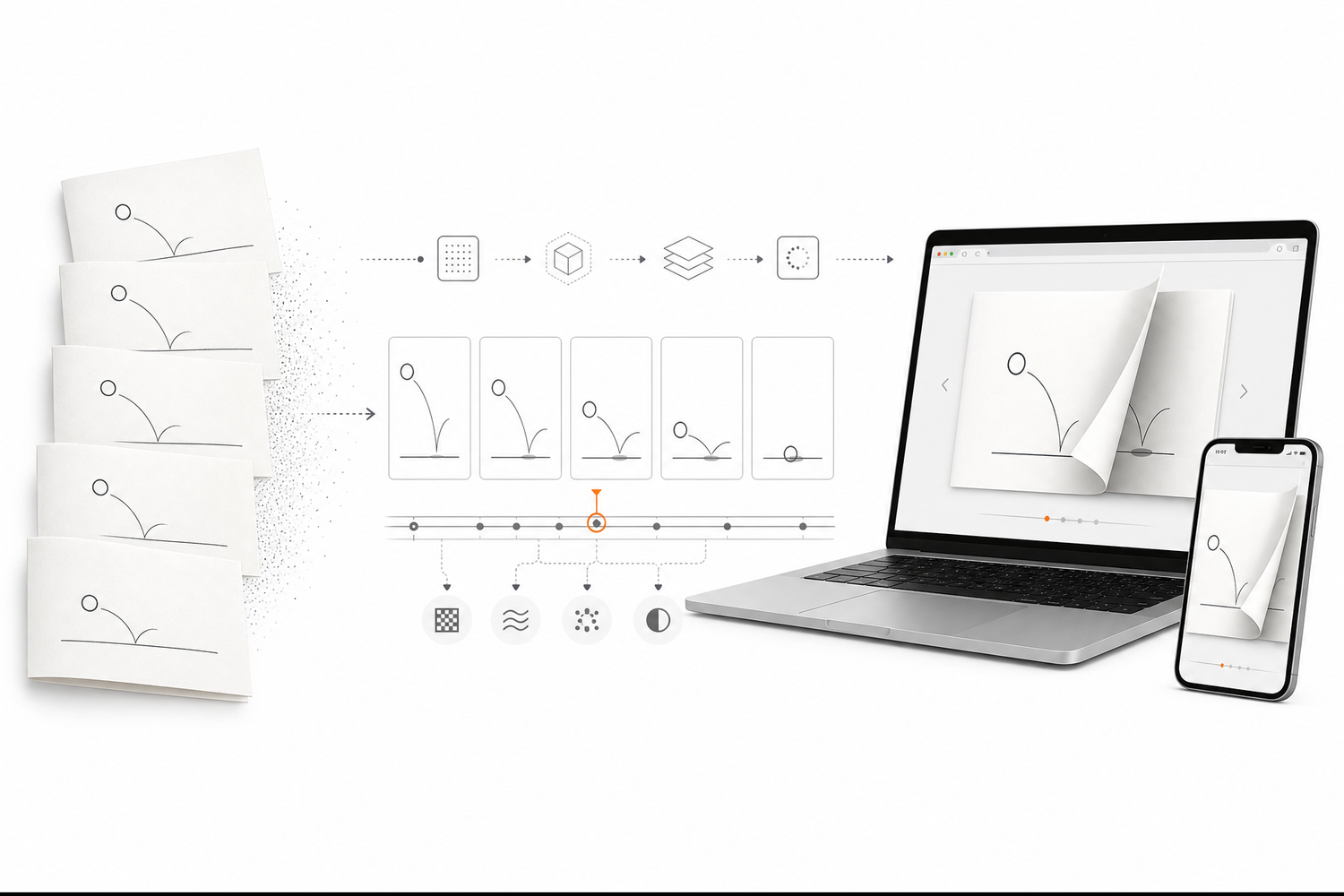
A flipbook looks simple.
A stack of pages moves quickly, and suddenly static drawings appear to move.
But when you try to recreate that experience in a browser, the problem becomes much more interesting.
You are no longer moving pieces of paper. You are rendering pages, handling user input, managing images, and keeping the animation responsive.
That is what I discovered while working on digital flipbooks with FlipFlow.
From a Traditional Flip Book to a Digital Experience
The basic idea behind a traditional flip book is simple.
Each page contains a slightly different frame. When the pages are turned quickly, our eyes connect those frames and perceive movement.
Page 1 → Page 2 → Page 3 → Page 4
   ↓        ↓        ↓        ↓
  Frame    Frame    Frame    Frame
              ↓
          Animation
A digital flipbook uses the same basic concept, but the browser has to reproduce the experience with software.
Instead of physically moving a sheet of paper, the application needs to:
Load or render the page.
Display the page at the right size.
Detect mouse, touch, or keyboard input.
Animate the page transition.
Keep the interaction responsive.
The page-turn animation is therefore only one part of the system.
What Happens Inside an HTML5 Flipbook?
A useful way to think about an HTML5 flipbook is as a pipeline:
PDF / PPT / Word / Images
          ↓
   Document Processing
          ↓
     Page Rendering
          ↓
     Browser Content
          ↓
   Page Flip Animation
          ↓
      Online Flipbook
The input might be a PDF, PowerPoint presentation, Word document, JPG, or PNG image.
The application first needs to turn that source material into pages that can be displayed consistently in a browser.
Then the browser becomes the reading environment.
This is an important difference between a static document and an online flipbook: the document is no longer only a file. It becomes an interactive web experience.
The Page Is More Important Than the Animation
When people search for a page flip effect, it is tempting to focus entirely on making the animation look realistic.
In practice, that can be the wrong priority.
A beautiful animation is not useful if:
pages take too long to load;
text becomes difficult to read;
images look blurry;
mobile gestures feel awkward;
navigation is confusing.
When building a flipbook, I found it more useful to think about the complete reading experience first.
The animation should make the transition between pages feel natural without becoming the main attraction.
Why Rendering Matters
A browser cannot simply treat every PDF page as an HTML document.
The source document has its own structure, fonts, images, dimensions, and layout rules. A flipbook application needs a reliable way to turn that content into something the browser can display.
For a simple publication, this may feel invisible to the reader.
For a large digital catalog, however, rendering and image management become much more important.
A practical pipeline needs to balance three things:
Visual Quality
      ↕
Loading Performance
      ↕
Reading Experience
Increasing image quality can increase file size.
Reducing file size too aggressively can make pages look poor.
The goal is not to maximize one number. It is to find a useful balance for the actual publication.
Making the Animation Feel Responsive
The next problem is interaction.
On desktop, a reader may click an arrow or drag a page.
On mobile, the same reader may swipe with a finger.
That means a flipbook needs to respond to different input methods while keeping the transition consistent.
A good implementation should also avoid making the reader wait unnecessarily before every page change.
This is one reason modern HTML5 flipbook implementations are interesting: the browser can handle the interface, animation, navigation, and interaction without requiring a traditional desktop application.
Where Flipbook Animation Fits
The animation becomes most useful when the content already has a page-based structure.
For example:
Digital catalogs can preserve the feeling of browsing a printed catalog.
Online magazines can create a familiar reading flow.
Sales collateral can feel more like a presentation than a file attachment.
Property brochures can present images and information page by page.
Annual reports can become easier to browse online.
Educational materials can turn static pages into a more engaging reading experience.
The same principle also applies to smaller creative projects and flip book animation experiments.
The format changes, but the underlying idea remains the same: a sequence of pages creates a sense of movement and progression.
From PDF to Flipbook
Most users do not want to rebuild an entire publication from scratch.
They already have a PDF.
That is why PDF to flipbook is such a practical workflow:
Existing PDF
     ↓
Page Processing
     ↓
HTML5 Flipbook
     ↓
Online Sharing
The important part is preserving the original content while adding a better way to interact with it.
For example, a company may already have a finished product catalog in PDF format. Instead of asking the design team to recreate the catalog for the web, a flipbook maker can turn the existing document into an online publication.
This can reduce duplicated work while giving the document a more interactive presentation.
Where AI Helps
AI adds another layer to the workflow.
An AI flipbook maker can help generate or organize content, especially for storybooks, educational material, or early-stage ideas.
But I do not think AI should replace the publishing workflow itself.
A practical process is closer to:
Idea
 ↓
AI-Assisted Content
 ↓
Human Review
 ↓
Page Structure
 ↓
HTML5 Flipbook
 ↓
Online Publishing
AI can accelerate content creation, but rendering quality, layout, interaction, and the final reading experience still need to be checked.
What I Learned Building FlipFlow
While working on FlipFlow, my perspective changed from thinking about a flipbook as an animation to thinking about it as a small web application.
The page-turn effect is visible.
The harder work is behind it:
processing different document formats;
keeping pages readable;
managing image quality;
supporting different screen sizes;
handling user interaction;
making the final publication easy to share.
FlipFlow is designed around that workflow. It supports PDF, PowerPoint, Word, JPG, and PNG files and turns them into interactive flipbooks that can be published online.
You can see the product here:
FlipFlow — Online Flipbook Maker
Final Thought
A traditional flip book creates movement by changing pages quickly.
An HTML5 flipbook takes that simple idea and adds everything a browser can provide: rendering, interaction, navigation, media, and online publishing.
That is why the interesting part is not simply the page flip effect.
The real engineering challenge is making all of these pieces work together without getting in the reader's way.
And that is what makes a modern digital flipbook more than a static PDF with an animation layered on top.


